
221 lines
16 KiB
Markdown
221 lines
16 KiB
Markdown
<!-- Logo -->
|
||
<p align="center">
|
||
<a href="https://github.com/Qolzam/react-social-network">
|
||
<img height="128" width="128" src="https://raw.githubusercontent.com/Qolzam/react-social-network/next/docs/app/logo.png">
|
||
</a>
|
||
</p>
|
||
<!-- Name -->
|
||
<h1 align="center">
|
||
<a href="https://github.com/Qolzam/react-social-network">React Social Network </a>:rocket:<span style="font-variant-caps: petite-caps;font-size: 30px;font-weight: 400;"> Version NEXT! </span>:rocket:
|
||
</h1>
|
||
|
||
[](https://gitter.im/react-social-network/Lobby?utm_source=badge&utm_medium=badge&utm_campaign=pr-badge&utm_content=badge)
|
||
|
||
The React Social Network is an open source project relying on [React](https://facebook.github.io/react/docs/hello-world.html) a powerful javascript library for building the user interface. In this project, I tried to show some features of react/react components as a social network.
|
||
The structure of this project give the ability to developer to develop their project on their own idea and environment.
|
||
|
||
<p align="center">
|
||
<a href="http://greensocial.herokuapp.com/">
|
||
<img src="https://raw.githubusercontent.com/Qolzam/react-social-network/next/docs/app/multi-device.png">
|
||
</a>
|
||
</p>
|
||
|
||
## 🌟New Upgrade :
|
||
React Social Network is [moving on](https://github.com/Qolzam/react-social-network/issues/48) [redux-observable](https://redux-observable.js.org/) however we keep [redux-thunk](https://github.com/gaearon/redux-thunk) version of **React Social Network** in branch name `v0.5`. Any contribution would be appreciate by :heart:.
|
||
|
||
>You should consult the [CHANGELOG](https://github.com/Qolzam/react-social-network/blob/next/CHANGELOG.md) and related issues for more information
|
||
|
||
This project adheres to the Contributor Covenant [code of conduct](https://github.com/Qolzam/react-social-network/blob/next/CODE_OF_CONDUCT.md).
|
||
By participating, you are expected to uphold this code. Please report unacceptable behavior to amir.gholzam@live.com.
|
||
|
||
## Example
|
||
|
||
[Love Open Social](https://love-social.firebaseapp.com)
|
||
|
||
## Required Knowledge
|
||
|
||
I recommend that you get to know React before using React Social Network. React Social Network has built by React components, so understanding how React fits into web development is important.
|
||
|
||
(If you're not familiar with the concept of Single Page Applications (SPAs), head over to the [here](https://www.codeschool.com/beginners-guide-to-web-development/single-page-applications) for a quick introduction before you read on.
|
||
|
||
## Document
|
||
|
||
Comming soon :) ...
|
||
|
||
|
||
## Roadmap
|
||
### Supporting diverse data platforms
|
||
Platform | Accessible
|
||
------------ | -------------
|
||
[Firebase/Firestore](firebase.google.com/cloud/firestore) | :+1:
|
||
[Amazon Web Service (AWS)](https://aws.amazon.com/) | On Developing :zap:
|
||
[Azure](https://aws.amazon.com/) | Future Support :star:
|
||
[ASP.NET Core](https://docs.microsoft.com/en-us/aspnet/core/) | On Developing :zap:
|
||
## Getting Started
|
||
|
||
These instructions will get you a copy of the project up and running on your local machine for development and testing purposes. See deployment for notes on how to deploy the project on a live system.
|
||
|
||
### Prerequisites
|
||
|
||
Install [NodeJs](https://nodejs.org/en/)
|
||
|
||
#### Note
|
||
|
||
- If you're using Windows you should install all node-gyp dependencies with following commands:
|
||
|
||
`$ npm install --global --production windows-build-tools`
|
||
and then install the package
|
||
|
||
`$ npm install --global node-gyp`
|
||
|
||
|
||
### Installing
|
||
|
||
1. Fork the [react-social-network](https://github.com/Qolzam/react-social-network) repository on Github
|
||
1. Clone your fork to your local machine
|
||
```bash
|
||
git clone git@github.com:<yourname>/react-social-network.git
|
||
```
|
||
1. Go to the project root directory
|
||
```bash
|
||
cd react-social-network
|
||
```
|
||
1. To install node dependencies use
|
||
```bash
|
||
npm install
|
||
```
|
||
OR
|
||
```bash
|
||
yarn install
|
||
```
|
||
1. Choose and install your backend before installing UI. React Network is able to be connected with every backend. Here we are developing some and you should choose one.
|
||
|
||
[](firebase.google.com/cloud/firestore)
|
||
**Video tutorial**
|
||
|
||
[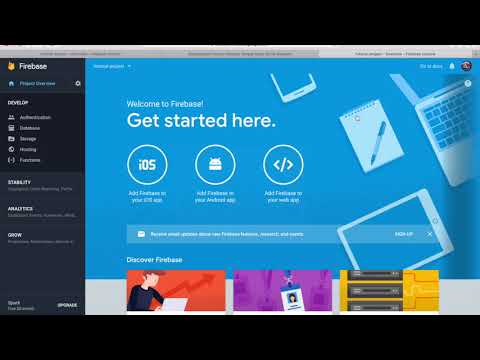](https://www.youtube.com/watch?v=zrqDE82Eny8)
|
||
#### [Firestore Social Backend](https://github.com/Qolzam/firestore-social-backend)
|
||
* Configure firebase:
|
||
* If you don't have firebase account, follow [Create firebase account](https://firebase.google.com/)
|
||
* Create Project open the [Firebase Console](https://console.firebase.google.com/) and create a new project.
|
||
* [Enable Firestore](https://firebase.google.com/docs/firestore/quickstart)
|
||
* [Enable firebase storage](https://firebase.google.com/docs/storage/) Go to [firebase console](https://console.firebase.google.com). Click on your `project name`. In `DEVELOP` menu choose `Storage`. Click on `GET STARTED`. In `dialog` click on `GOT IT`.
|
||
* Get [firebase config](https://firebase.google.com/docs/web/setup) Go to [firebase console](https://console.firebase.google.com). Click on your `project name`. In `Project Overview` page click on `Add Firebase to your web app`. In dialog box copy `var config = <copy this area>` configuration key/value. Open config file `react-social-network` root directory in `src/config/environment.dev.ts`. Pate your config in `firebase : <paste here>`.
|
||
* [Enable Email/Password Authentication](https://firebase.google.com/docs/auth/web/password-auth) sign-in on firebase:
|
||
* In the Firebase console, open the Auth section.
|
||
* On the Sign in method tab, enable the Email/password sign-in method and click Save.
|
||
* [Enable OAuth](https://firebase.google.com/docs/auth/) We are supporting sign-in with Github, Google and Facebook. Following [firebase document](https://firebase.google.com/docs/auth/) you can enable each one you need.
|
||
* [Install Firestore Social Backend](https://github.com/Qolzam/firestore-social-backend) Follow instruction of [Firestore Social Backend](https://github.com/Qolzam/firestore-social-backend)
|
||
* Enable firestore dependencies
|
||
* Go to React Social Network folder in `src/socialEngine.ts` write `useFirestore(provider)` to enable firestore dependencies!
|
||
|
||
#### AWS Social Backend
|
||
* Coming soon ...
|
||
#### [ASP.NET Social Backend](https://github.com/Qolzam/aspnet-core-social-network)
|
||
* Coming soon ...
|
||
1. Go ahead ;)
|
||
```bash
|
||
npm start
|
||
```
|
||
|
||
## What is new? :star2:
|
||
### Structure
|
||
New structure could make the project easy to change and scale up.
|
||
There are three main layers:
|
||
- [Core](https://github.com/Qolzam/react-social-network/tree/next/src/core)
|
||
- [Domain](https://github.com/Qolzam/react-social-network/tree/next/src/core/domain)
|
||
- [Providing interface for data services](https://github.com/Qolzam/react-social-network/tree/next/src/core/services)
|
||
- [Data](https://github.com/Qolzam/react-social-network/tree/next/src/data)
|
||
- This layer provide supporting variety of data platforms such as [Firebase](https://firebase.google.com/), [AWS](https://aws.amazon.com/), ... .
|
||
- [FirestoreClient](https://github.com/Qolzam/react-social-network/tree/next/src/data/firestoreClient)
|
||
- AwsClient
|
||
- AspNetClient
|
||
- ...
|
||
- [Components](https://github.com/Qolzam/react-social-network/tree/next/src/components)
|
||
- This layer take care of user interface which on [React](https://reactjs.org) and in [react-mobile-social] on [React Native](https://facebook.github.io/react-native/). It means **the only thing change here among these three layers on mobile app, is component layer**.
|
||
|
||
### IOC Container
|
||
- Using [InversifyJS](http://inversify.io/) in project give us the ability to switch between custom dependencies easily. Specially for *data layer*, if you are the user working with [AWS](https://aws.amazon.com/) you only need to call `useAws()` or using [Firebase](https://firebase.google.com/) call `useFirestore()` in [SocialEngine](https://github.com/Qolzam/react-social-network/blob/next/src/socialEngine.ts#L20) file.
|
||
### Features
|
||
- We moved from custom webpack to [create-react-app](https://github.com/facebook/create-react-app).
|
||
- Support Localization by [react-localize-redux](https://github.com/ryandrewjohnson/react-localize-redux). Providing this feature we support variety of languages. To contribute :heart: your language you are able to add your local language. You only need to edit `en.json` from `react-social-network` root project and `src/locale/en.json`. You should name your file according ISO 639-1 Language Codes. For example for Spanish you should name `es.json`. Which `es` is the standard code of Spanish language.
|
||
- [InversifyJS](http://inversify.io/) as IOC container
|
||
- Add auto compile on changing code for `webpack`
|
||
- Open browser on after compiling on `npm start`. You need to set `PORT=[PORT_NUMBER]` in [config file](https://github.com/Qolzam/react-social-network/blob/next/docs/app/configure/development.env).
|
||
- Add reset password, confirm password and authorizing by GitHub, Google and Facebook.
|
||
- Add scroll auto loading for show posts and people pages.
|
||
- Using [Firestore](https://firebase.google.com/docs/firestore/)
|
||
- Supportig `Right To Left`
|
||
- Some cool stuff :)
|
||
## Can I connect React Social Network to other data platforms ? :bowtie:
|
||
Your server side is on `PHP`, `Java`,`ASP.NET`, `Python`, etc. Or you are using serverless platforms such as `Google Cloud`, `AWS`, `Azure`, etc. You can connect `React Social Network` to any data platform. You only need to implement the [interfaces of core services](https://github.com/Qolzam/react-social-network/tree/next/src/core/services) like implementation of [firestoreClient](https://github.com/Qolzam/react-social-network/tree/next/src/data/firestoreClient).
|
||
|
||
There are a summary steps of creating your own `dataClients`. We assume that we want to implement for `PHP` backend.
|
||
|
||
* You need to know about [TypeScript](https://www.typescriptlang.org/samples/index.html) and implementing interfaces which I recommend take a look at [this article](https://www.typescriptlang.org/docs/handbook/interfaces.html).
|
||
|
||
* You can get help from other [dataClient](https://github.com/Qolzam/react-social-network/tree/next/src/data) implementation for your backend algorithm and also using [core domain](https://github.com/Qolzam/react-social-network/tree/next/src/core/domain) for the backend domain could be helpful.
|
||
|
||
1. Create a folder in [data layer](https://github.com/Qolzam/react-social-network/tree/next/src/data) name `phpClient`.
|
||
2. Create a folder in `/phpClient` folder name `services` then in `services` folder create some folders following [core/services folder](https://github.com/Qolzam/react-social-network/tree/next/src/core/services) such as `services/votes`, `services/posts` and etc.
|
||
3. In each folder inside `/phpClient/services/*` folder you should implement following interfaces in `core/services/*` folder in file with appropriate name. For example we need to implement `IPostService` from `core/services/posts/IPostService.ts` in `data/phpClient/services/posts/PostService.ts` file.
|
||
4. After implementing interfaces for services layer. We should register the dependencies for our `phpClient` services. Create a file in `phpClient` folder name `dependecyRegisterar.ts`.
|
||
5. Following `firestoreClient` dependencies, add a function name `usePhp()` and bind dependencies in the the function. For example for `PostService` class add `container.bind<IPostService>(SocialProviderTypes.PostService).to(PostService)`. Here `SocialProviderTypes` has the identifier of each service. To learn more take a look at [inversify docs](http://inversify.io/).
|
||
6. Finally call registering dependencies function for in [socialEngine](https://github.com/Qolzam/react-social-network/blob/next/src/socialEngine.ts#L22) file.
|
||
7. Enjoy ;)
|
||
|
||
> :heart_eyes: It also would be great if you could contribute your `clientData` and `backend` with us to be part of this contribution. We would appreciate any conntribution.:thumbsup:
|
||
|
||
|
||
## Deployment
|
||
- In command line of [react-social-network] root project, type [firebase login](https://firebase.google.com/docs/cli/). This command connects your local machine to your Firebase account and grants access to your projects. To test that authentication worked, you can run firebase list to see a list of all of your Firebase projects. The list should be the same as the projects listed at [Firebase console](https://console.firebase.google.com).
|
||
- Be sure the name of firebase project for [react-social-network] and this project is same. You also need to check `.firebaserc` if you set correct project name in `default` field of `projects` field.
|
||
```bash
|
||
npm run deploy:firebase
|
||
```
|
||
|
||
## Built With
|
||
|
||
* [TypeScript](https://www.typescriptlang.org/) TypeScript is a superset of JavaScript that compiles to clean JavaScript output.
|
||
* [JSX/TSX](https://jsx.github.io/) This project support both *.jsx and *.tsx files. JSX is a statically-typed, object-oriented programming language designed to run on modern web browsers. Being developed at DeNA as a research project, the language has following characteristics.
|
||
* [React](https://facebook.github.io/react/docs/hello-world.html) A javascript library for building user interfaces.
|
||
* [Redux](http://redux.js.org/) is a predictable state container for JavaScript apps.
|
||
* [Material-UI](http://www.material-ui.com/#/) A Set of React Components that Implement Google's Material Design.
|
||
* [react-redux](https://github.com/reactjs/react-redux) Official React bindings for Redux.
|
||
* [Firebase](https://firebase.google.com/) products like Analytics, Realtime Database, Messaging, and Crash Reporting let you move quickly and focus on your users.
|
||
* [redux-thunk](https://github.com/gaearon/redux-thunk) Redux Thunk middleware allows you to write action creators that return a function instead of an action. The thunk can be used to delay the dispatch of an action, or to dispatch only if a certain condition is met. The inner function receives the store methods dispatch and getState as parameters.
|
||
* [React Router V4](https://github.com/ReactTraining/react-router) for routing website location
|
||
* [Sass](http://sass-lang.com/) CSS with superpowers. Sass boasts more features and abilities than any other CSS extension language out there.
|
||
* [InversifyJS](http://inversify.io/) InversifyJS is a lightweight (4KB) inversion of control (IoC) container for TypeScript and JavaScript apps. A IoC container uses a class constructor to identify and inject its dependencies.
|
||
* [create-react-app](https://github.com/facebook/create-react-app) Create React App is a tool built by developers at Facebook to help you build React applications. It saves you from time-consuming setup and configuration. You simply run one command and create react app sets up the tools you need to start your React project.
|
||
|
||
## :heart: Contributing :heart:
|
||
|
||
[React Social Network](https://love-social.firebaseapp.com) has been made by love:heart:. I planed to build a back-end for this project and improve the performance as I process all procedures on the front-end side. If you'd like to help,
|
||
check out the [document](https://qolzam.gitbooks.io/react-social-network/).
|
||
I'd greatly appreciate any [contribution](https://github.com/Qolzam/react-social-network/blob/next/CONTRIBUTING.md)
|
||
|
||
## Versioning
|
||
|
||
We use [SemVer](http://semver.org/) for versioning. For the versions available, see the [tags on this repository](https://github.com/Qolzam/react-social-network/tags).
|
||
|
||
## Authors
|
||
|
||
- Amir Movahedi
|
||
- See also the list of [contributors](https://github.com/Qolzam/react-social-network/contributors) who participated in this project.
|
||
|
||
## How To Support
|
||
- [Contribution](https://github.com/Qolzam/react-social-network/blob/next/CONTRIBUTING.md)
|
||
- Fork || Star
|
||
## License
|
||
|
||
This project is licensed under the MIT License - see the [LICENSE](https://github.com/Qolzam/react-social-network/blob/next/LICENSE) file for details
|
||
|
||
|
||
## Acknowledgments
|
||
|
||
* React
|
||
* Firebase
|
||
* JavaScript
|
||
* TypeScript
|